GDPR Website Compliance for UK Trade Businesses

If your business website collects anything that identifies a person, UK GDPR applies to it. For a plumber, electrician or landscaper that usually means five things: a privacy notice, a cookie banner that works properly, enquiry forms that collect only what you need, a written agreement with the suppliers that handle the data, and a plan for what you do if something goes wrong. None of it needs a lawyer for a typical trade site, but it does need doing properly. We build and manage trade websites in a 10 to 14 day turnaround, so this is the checklist we would hand a contractor before launch.
This guide covers the rules that apply to a UK business website. It is general information, not legal advice. If you handle unusual data, such as health information or criminal records, speak to a data protection solicitor or the Information Commissioner’s Office (ICO), the UK regulator.
TL;DR
- UK GDPR and the Data Protection Act 2018 apply to any UK business that handles personal data, and a website enquiry form, a phone number left in a message or an IP address all count.
- Almost every business website needs a privacy notice, linked from the footer and from every form.
- Cookies that are not strictly necessary need consent before they are set. Carrying on browsing is not consent.
- Collect only what you need on a form, keep it only as long as you need it, and have a contract with every supplier that touches it.
- You must tell the ICO about a notifiable breach within 72 hours of becoming aware of it, where feasible.
Table of Contents
- Which laws apply to a UK business website
- What counts as personal data on a trade website
- Step 1: Find out what your site collects
- Step 2: Write a privacy notice that matches reality
- Step 3: Get cookie consent right
- Step 4: Make your forms collect less
- Step 5: Control the suppliers that touch your data
- Step 6: Keep the data secure, and know what a breach is
- Step 7: Be ready for requests from the public
- The compliance checklist
- Getting a site that is built with this in mind
- FAQ
- Sources
Which laws apply to a UK business website
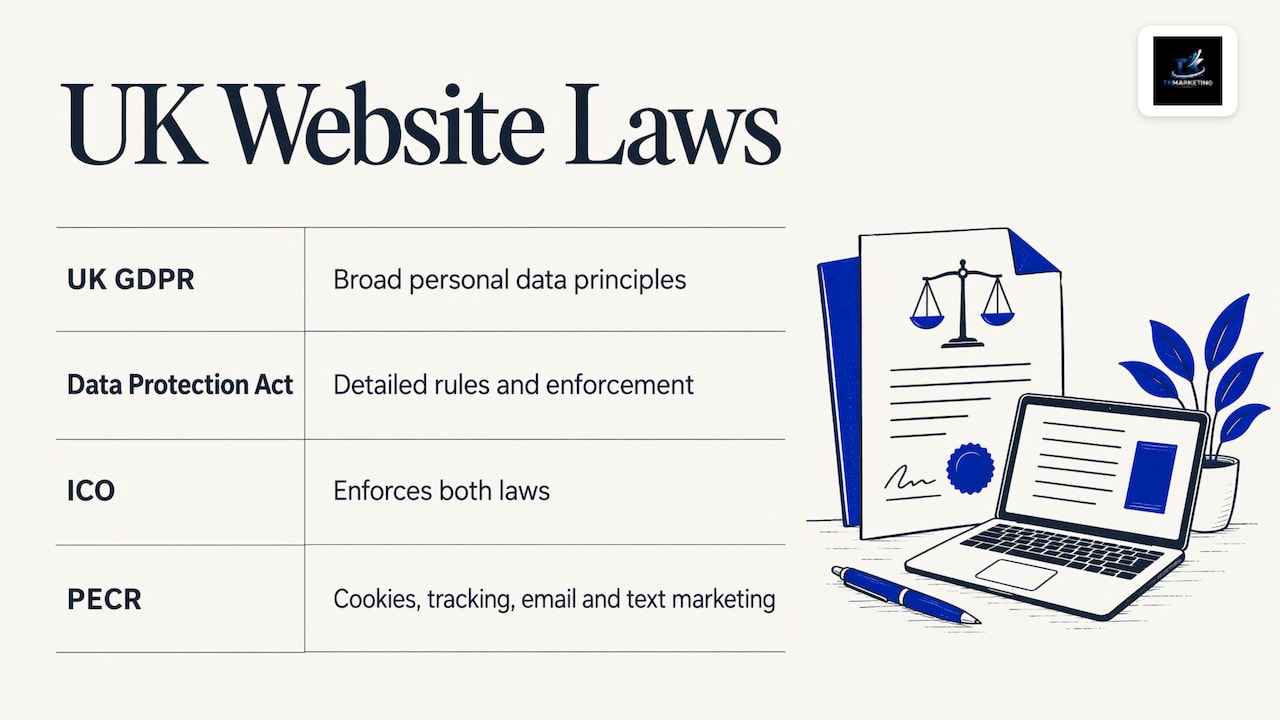
Two pieces of law do most of the work. According to business.gov.uk, UK data protection is made up of the UK GDPR, which sets the broad principles for handling personal data, and the Data Protection Act 2018, which adds detailed rules and enforcement. The ICO is the body that enforces both.
A third set of rules, the Privacy and Electronic Communications Regulations (PECR), covers cookies and similar tracking technologies and also marketing by email and text. When people talk about “cookie law” they mean PECR, not the GDPR itself.
Does it apply to you? The ICO says the UK GDPR applies to organisations operating within the UK, and also to organisations outside the UK that offer goods or services to people in the UK. A sole trader in Corsham with a one-page site is covered just as a limited company is. The only exclusions are things like law enforcement and purely personal or household use, and neither describes a trading business.
The UK version is not identical to the EU one. The ICO’s guidance on territorial scope lists signs that a business is targeting UK customers, such as a .co.uk domain, prices in pounds sterling and UK customer testimonials. If your site has those, assume UK rules apply.
What counts as personal data on a trade website
Personal data is anything that could identify a living person. The business.gov.uk guidance lists names, addresses, emails and messages, photographs and recordings, and online identifiers such as IP addresses.
On a typical trade site that includes:
- Names, phone numbers, emails and addresses typed into a quote or contact form.
- Photos customers send you of a leaking roof or a garden to be landscaped.
- Messages sent through a chat widget or a missed-call text service.
- IP addresses and device identifiers collected by analytics and advertising tools.
- Customer testimonials that carry a full name or a photo.
That last one catches people out. A review with a name and town on it is personal data you are publishing. Use first names and towns, or get the customer’s agreement to the format you use.
Step 1: Find out what your site collects
Compliance starts with an inventory. The ICO’s controllers checklist says one person with in-depth knowledge of how the business works can complete the information audit, and that writing the findings into an information asset register helps with the accountability principle, which is the duty to be able to show you comply.
For a website, the audit is a walk through every page and tool:
- List every form and what fields it has.
- List every script on the site: analytics, advertising pixels, maps, embedded videos, chat, call tracking, reviews widgets.
- For each, write down what personal data it collects, why, who receives it and how long you keep it.
- Note where the enquiries end up: an inbox, a CRM, a spreadsheet, a phone.
A content audit tool such as an AI content optimisation audit can help you list what each page contains, which makes the walk-through quicker on a site with many service pages.
The usual mistake is forgetting tools that were added years ago by someone else. An old Facebook pixel or a retired chat widget can still be sending visitor data out. On a site we manage, hosting, updates and security checks are part of the monthly management, so third-party scripts are kept to what the site actually uses.
Step 2: Write a privacy notice that matches reality
Does a UK business website need a privacy policy? Yes. The ICO says that if your company holds personal data, which generally includes any small business, you need a privacy notice, and there are very few situations where privacy information is not needed. “Privacy policy” and “privacy notice” mean the same thing in practice.
According to business.gov.uk, the notice must say:
- who you are and how to contact you;
- what personal data you collect and how;
- why you have it and which lawful basis you rely on;
- how long you keep it;
- who you share it with;
- people’s rights to access or amend their data.
It should be freely available, with links on your website, in forms and wherever you collect data. In practice that means a footer link on every page and a short line beside every form submit button.
The ICO also says you should give people the notice when you first collect their details and review it regularly. If you get details from somewhere other than the person, tell them where to find the notice as soon as possible and within one month.
You do not need to write it from scratch. The ICO’s privacy notice tool has been updated to reflect the Data (Use and Access) Act 2025, with templates for general businesses and for small and medium-sized businesses. The trap with any template is leaving in a sentence that is not true of your business. If the notice says you never share data with third parties and your enquiries go through a hosted form tool, it is wrong.
Pick the right lawful basis
The notice has to name a lawful basis for each use of data. The ICO’s guide to lawful basis lists the options under Article 6 of the UK GDPR: consent, contract, legal obligation, vital interests, public task, recognised legitimate interests and legitimate interests. For a trade business, the common pairings are:
| Use of data | Usual lawful basis |
|---|---|
| Replying to a quote request | Legitimate interests, or steps toward a contract |
| Carrying out and invoicing a job | Contract |
| Keeping accounting records | Legal obligation |
| Non-essential cookies and tracking | Consent (under PECR) |
| Marketing emails to people who have not bought from you | Consent |
The ICO is clear that “necessary” means a targeted, proportionate way of achieving a specific purpose. It is not enough that the processing is useful or that it is how you have always worked. If you ask for a date of birth on a quote form, you need a reason that stands up.
Step 3: Get cookie consent right
Cookies are where most small business sites fall down, because the rule is stricter than many people expect. The ICO’s guidance on cookies says you must tell people cookies are used and what they do, and get consent, except for cookies that solely transmit a communication or are strictly necessary to provide a service the user asked for.
In plain terms:
- Strictly necessary cookies (a basket, a security token, remembering a consent choice) need no consent.
- Everything else needs consent before it is set. That includes advertising pixels and, unless an exception is met, analytics.
- Consent must be freely given, specific and informed, shown by a clear positive action. Carrying on using the site is not consent.
- Non-essential cookies must not load before the visitor agrees. A banner that sits on top of a page that has already fired its tracking is not compliant.
- Visitors need an easy way to switch non-essential cookies on or off, and an easy way to change their mind.
The ICO also states that no advertising purpose can count as strictly necessary. If you run Google or Facebook ads and use their tracking on your site, that tracking needs consent first.
There is one change worth knowing about. The Data (Use and Access) Act 2025 and the ICO’s updated storage and access technologies guidance have brought some low-risk uses, such as certain statistical and appearance cookies, closer to an exception, as long as you give clear information and an easy way to object. Where you are unsure whether a tool qualifies, treat it as needing consent and read the ICO’s current page rather than relying on a summary.
Our own guide on cookie consent for UK business websites goes through the banner choices in more detail.
Step 4: Make your forms collect less
A quote form is the one place on a trade website where you deliberately collect personal data, so it is where the principles bite hardest. business.gov.uk’s advice is to limit collection to what is necessary and relevant, use it only for specified purposes and keep it only as long as necessary.
A practical test for each field: if I removed it, could I still quote? For most jobs you need a name, a phone number or email, a postcode and a description of the work. You do not need a date of birth, a home phone and a mobile, or a “how did you hear about us” free text box that invites people to type their life story.
On consent and marketing, the ICO’s controllers checklist advises:
- unticked opt-in boxes, never pre-ticked;
- separate choices for separate purposes, rather than one bundled tick;
- naming any third parties who will rely on the consent;
- telling people they can withdraw consent at any time.
And put the privacy notice link right beside the button. A visitor sending a photo of their kitchen wall should see, at that moment, who will hold it and why.
Step 5: Control the suppliers that touch your data
Your website is almost never just you. Hosting, the form tool, the email service, analytics, a call tracking or text-back service and a CRM can all hold your enquiry data. Under the UK GDPR you are the controller, meaning you decide why and how the data is used, and those suppliers are processors acting for you.
Article 28 requires controllers to use only processors that provide sufficient guarantees, under a binding contract that sets out the subject matter, duration, nature and purpose of the processing. The contract must require the processor to act only on your documented instructions and to keep the data confidential. Most reputable providers publish a data processing agreement you accept online. Your job is to make sure one exists for each supplier on your inventory and that you have kept a copy.
If a supplier is a stranger you cannot easily contact, that is a risk in itself. We build trade sites with direct contact and handle the technical side, so there is one named party for hosting and updates rather than five accounts to chase.
Step 6: Keep the data secure, and know what a breach is
Security is a legal duty, not a nice extra. business.gov.uk says to store personal data securely and to notify the ICO of relevant breaches. A breach is not only hacking: a stolen laptop with your enquiries on it, an email sent to the wrong customer or an unpatched plugin that lets someone in all count.
The timings are firm. Under Article 33, you must notify the ICO without undue delay and, where feasible, within 72 hours of becoming aware of a breach, unless it is unlikely to risk people’s rights and freedoms. Under Article 34, if the breach is likely to result in a high risk to individuals, you must also tell them, without undue delay and in clear, plain language.
Practical basics for a trade site:
- keep the website platform, plugins and themes up to date;
- use unique passwords and two-step login on hosting and email;
- keep tested backups, so an attack does not become lost data;
- remove old staff and contractor accounts;
- write down who you would call, and what you would do, in the first hour.
We cover these in our website security checklist for small businesses and in a plain guide to website backups.
Step 7: Be ready for requests from the public
People can ask what you hold about them, ask you to correct it or ask you to delete it. business.gov.uk says subject access requests must be answered within one month, and that you usually cannot charge a fee. A short written routine is enough: who receives requests, where you search (inbox, form tool, CRM, phone), and who replies.
Record keeping is lighter for small firms than many assume. The ICO’s controllers checklist says businesses with fewer than 250 employees only need to keep formal processing records for processing that is not occasional, is likely to risk individuals’ rights and freedoms, or involves special category or criminal offence data. Even so, the one-page inventory from Step 1 is worth keeping, because it answers most questions you will ever be asked.
The compliance checklist
| Item | Done when |
|---|---|
| Privacy notice | Linked in the footer and beside every form, and matches what you do |
| Lawful basis | Written down for each use of data |
| Cookie banner | Non-essential cookies load only after a clear opt-in |
| Forms | Only necessary fields, unticked marketing boxes |
| Suppliers | Processing agreement held for each |
| Security | Updates, backups, strong logins in place |
| Breach plan | You know who to call and the 72-hour deadline |
| Requests | You can answer within one month |
Compliance is not a one-off. Tools get added, forms change and the ICO updates its guidance, so the privacy notice and cookie settings should be rechecked whenever the site changes. The ICO itself says to review the notice regularly and to draw changes to people’s attention.
Our view: a compliant site is a trusted site
Most trade owners we speak to treat data protection as a chore for the end of a build. We think it belongs at the start, because the same choices that keep a site compliant also make it better at its job: fewer form fields get more enquiries finished, a clear privacy line next to the button reassures a nervous homeowner, and a lean set of scripts keeps pages fast.
The ICO describes a clear privacy notice as something that helps build trust and lets everyone know what to expect, and we agree. A customer deciding whether to hand a stranger their address wants to see that you are organised.
That is why our websites are fully managed. We supply the written content, handle the technical side, and monthly management covers hosting, updates and security checks, so the site does not drift out of date while you are on a roof. We design for phone calls and enquiries, and we treat the legal basics as part of building it properly, not as a bolt-on.
Trey
Getting a site that is built with this in mind
If your current site was built years ago and you cannot say what it collects, a rebuild is often quicker than patching. We complete trade websites in 10 to 14 days, with written content supplied and SEO built in. Our Shopfront plan is £39 per month with a £299 one-off setup, Shopfront Plus is £59 per month with a £399 setup, and Website Max is £499 per month with a £599 setup. Full details are on our pricing page.
If you want the privacy notice, cookie choices and form wording sorted as part of the build, get started with a TK Marketing package. Before any new site goes live, our website launch checklist is worth running through as well.
FAQ
Is GDPR compliance mandatory in the UK?
Yes. The UK GDPR and the Data Protection Act 2018 apply to any organisation that handles personal data, including sole traders and small limited companies. The ICO enforces them. There is no minimum size below which a trading business is exempt.
Does GDPR still apply to the UK after Brexit?
The EU GDPR no longer applies directly, but the UK has its own version, the UK GDPR, which sits alongside the Data Protection Act 2018. It has been updated by the Data (Use and Access) Act 2025. If you also sell to people in the EU, EU rules may apply to that activity as well.
Do I need a cookie banner if I only use Google Analytics?
Possibly. Cookies that are not strictly necessary need consent unless a PECR exception applies, and for statistical cookies you must give clear information and an easy way to object. Check the ICO’s current storage and access technologies guidance for your specific tool, and make sure nothing non-essential loads before the visitor chooses.
What happens if my website suffers a data breach?
You must notify the ICO without undue delay and, where feasible, within 72 hours of becoming aware, unless the breach is unlikely to risk people’s rights. If the risk to individuals is high, you must tell them too, in plain language. Keep a note of what happened and what you did.
Sources
- Data protection in your business, business.gov.uk
- Who does the UK GDPR apply to? ICO
- Territorial scope fundamentals, ICO
- Controllers checklist, ICO
- Cookies and privacy notices in detail, ICO
- Create your own privacy notice, ICO
- A guide to lawful basis, ICO
- Cookies and similar technologies, ICO
- UK GDPR Chapter IV, legislation.gov.uk