Website Management vs Maintenance: What Trades Need
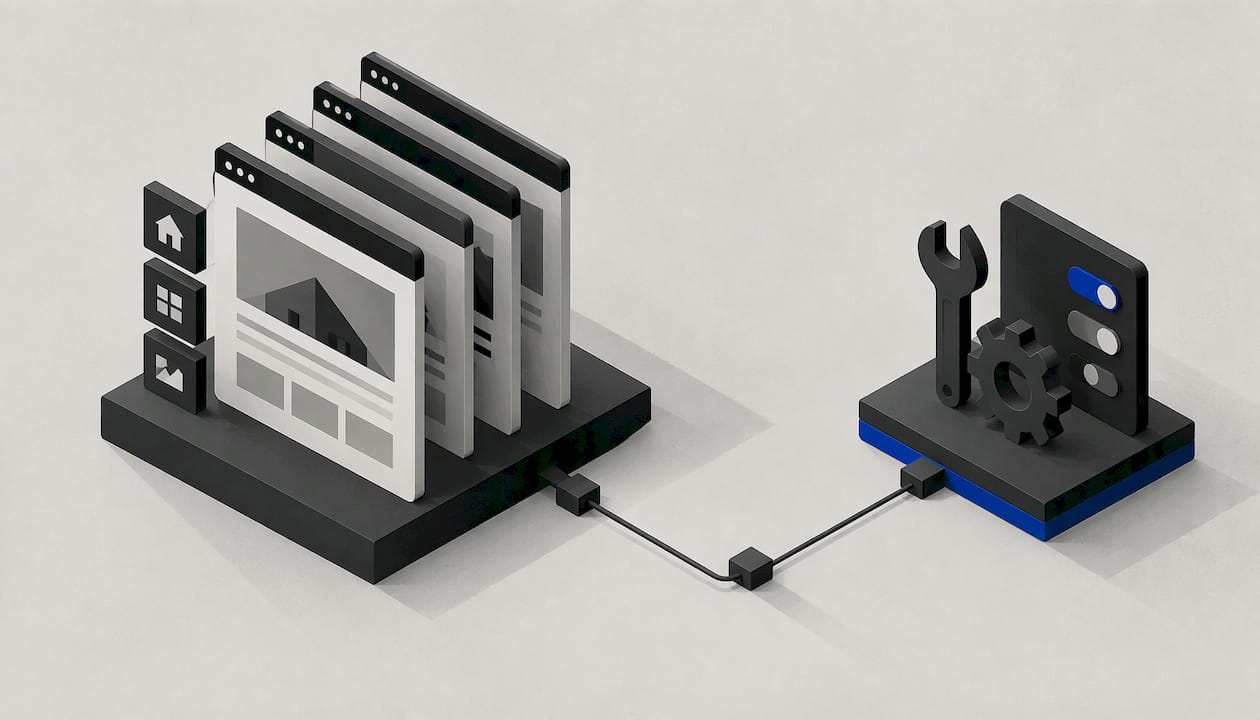
Maintenance keeps your website working. Management keeps it working for the business. Maintenance is the technical upkeep: updates, security, backups, uptime. Management includes all of that and adds the jobs that turn a site into a source of calls: changing content, keeping details accurate, looking after how you appear on Google and acting when something stops bringing in enquiries. For a plumber, electrician or builder in Wiltshire who wants the phone to ring and has no time to run a website, the practical answer is a managed service where one provider owns both.
TL;DR
- Maintenance is keeping the site safe, updated, backed up and online. It prevents breakdowns but does not, on its own, add enquiries.
- Management covers maintenance plus content edits, support and the work that keeps the site useful to customers and visible on Google.
- Hosting is only the server your site sits on. Support is someone to ask when something needs changing. Neither is the same as being looked after.
- Check any quote for four things: who makes updates, who restores the site if it breaks, who edits your pages, and who you can phone.
- Our own monthly management starts from £20 a month, and our site plans run from £39 a month.
Table of Contents
- What website maintenance means
- What website management means
- Management vs maintenance side by side
- Where hosting and support fit in
- What UK small businesses have paid for upkeep
- Which one does a trade business need?
- Questions to ask before you sign anything
- How we handle it at TK Marketing
- Our view on management
- FAQ
- Sources
What website maintenance means
Maintenance is the routine work that stops a website decaying. Software gets old, security holes open, plugins stop working with each other, and a site that was fine at launch begins to fail quietly. Typical maintenance tasks are:
- installing updates to the site’s software, themes and plugins
- security checks and malware scanning
- regular backups, and the ability to restore them
- monitoring that the site is online and the contact forms and phone links still work
- renewing the domain name and SSL certificate (the padlock that shows the connection is secure)
The National Cyber Security Centre’s small business guidance says all businesses should take regular backups of important data and make sure they can be restored. A backup you have never restored is a hope, not a plan. If you want the full task list for a WordPress site, our WordPress maintenance checklist walks through it, and our guides to website backups and the website security checklist go deeper on the two jobs that cause the most damage when skipped.
Maintenance is largely invisible. When it is done well, nothing happens. That is its value, and also why many trade businesses stop paying for it: there is no visible result to point at until the day something breaks.
What website management means
Website management treats the site as something that works for the business every month, not just a piece of software to be kept running. It includes maintenance, then goes further:
- Content changes. New services, a new area covered, updated photos of recent jobs, a changed phone number or opening hours.
- Support. A named person you can contact to make a change, rather than a ticket queue or a forum.
- Search visibility. Pages that match what local customers type, and a Google Business Profile that is accurate and active.
- Enquiry flow. Checking that the phone number, call buttons and forms lead where they should.
- Brand consistency. The site matching your van, signage and printed material so customers recognise you.
The breadth matters because a website is only one part of how customers find a trade business. Getting enquiries depends on being found, being believed and being easy to contact. Our partner reading on what lead generation involves for business owners covers the wider picture of turning attention into work.
Management vs maintenance side by side
| Maintenance | Management | |
|---|---|---|
| Main aim | Keep the site secure, current and online | Keep the site useful and bringing in enquiries |
| Typical tasks | Updates, backups, security scans, uptime checks | Everything in maintenance, plus content edits, support, search and profile upkeep |
| Who it suits | Someone with an in-house person to make changes | A busy owner who wants one provider to handle it |
| Visible result | Mostly none, because problems are prevented | Fresh pages, accurate details, a site that reflects current work |
| Typical question it answers | “Is the site safe?” | “Is the site doing its job?” |
The two are not rivals. Management contains maintenance. The real question is whether you are buying only the technical part or the whole job.
Where hosting and support fit in
People searching this topic often meet two more terms that get mixed up with these.
Hosting is the computer space where your site’s files live so that it can be seen online. A hosting fee keeps the site reachable. It does not mean anyone is updating, securing or editing it. Some hosting packages include basic backups, but a host is not responsible for how your pages read or whether they convert callers.
Support is access to help. It might be a helpdesk, an email address or a person on the phone. Support answers questions and makes requested changes, but it usually waits for you to raise the problem. Maintenance is proactive, support is reactive.
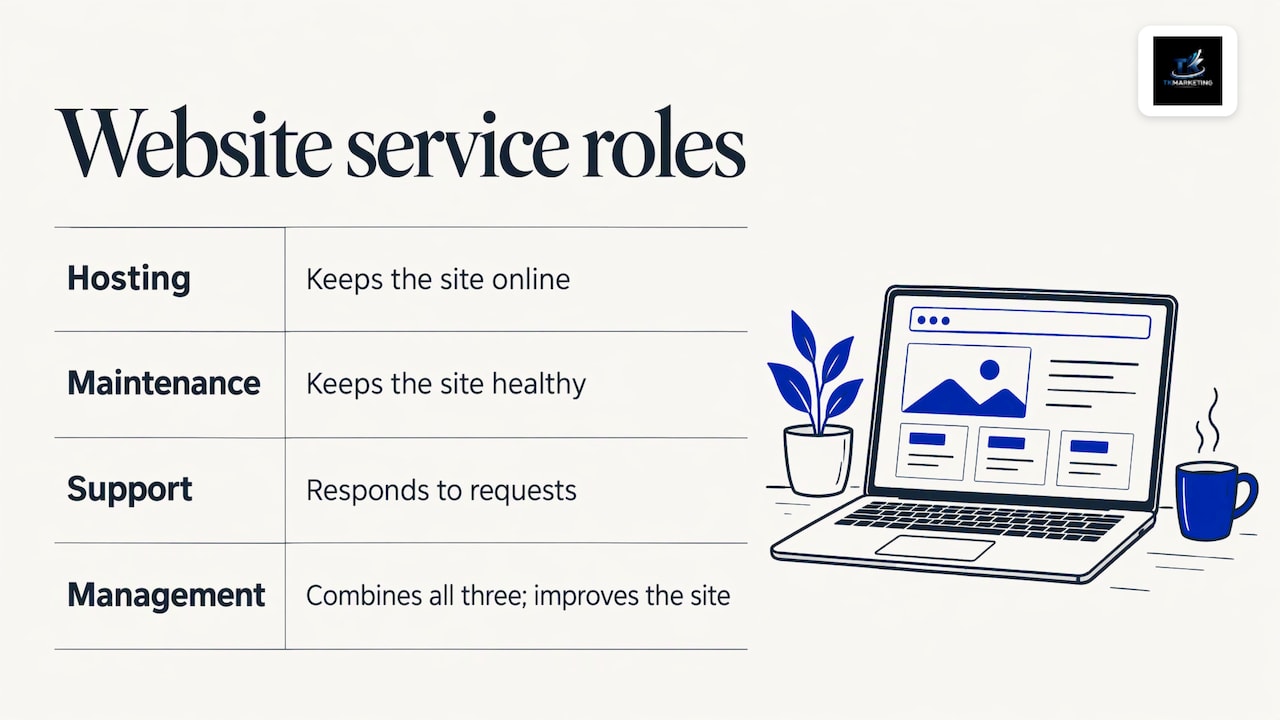
So a typical split looks like this: hosting keeps the site online, maintenance keeps it healthy, support responds when you ask, and management ties all three together and adds the ongoing improvement. If a quote lists only one of these, you are buying a part of the job. The rest still falls to you.
What UK small businesses have paid for upkeep
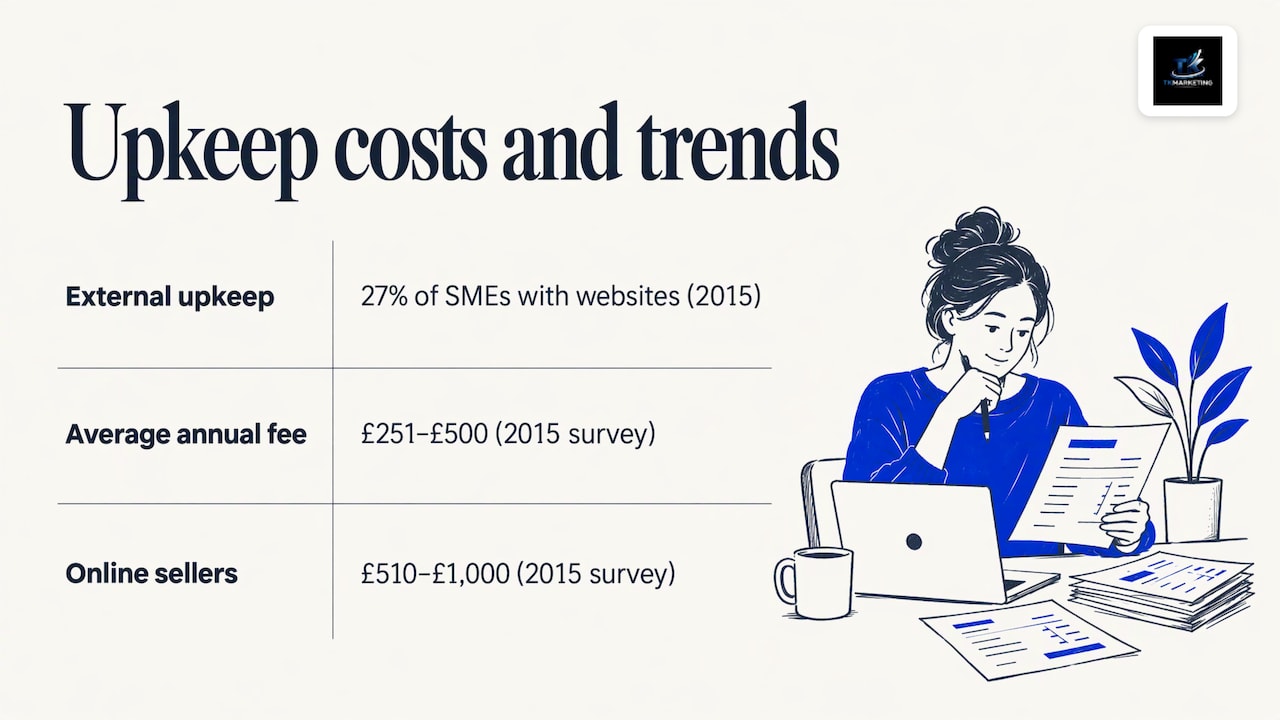
The UK government’s evidence review of small business digital capabilities found that 27% of SMEs with websites paid an external person or business to maintain them. The reported average annual fee was £251 to £500, or £510 to £1,000 for businesses selling online. These are 2015 survey figures and not today’s prices, but they show two things that still hold: most small firms handle upkeep themselves or not at all, and the more a site is used to trade, the more attention it gets and the more it costs.
The same review suggests the right level of ongoing attention depends on the site’s role. For a trade business, the site is a promotional tool: its job is to make a stranger in Corsham, Chippenham or Bath pick up the phone. That points towards a light technical layer plus regular, practical edits, not an enterprise-style programme.
For current UK pricing and what typically sits in each tier, see our guide to website maintenance costs for trades.
Which one does a trade business need?
Think about who will do the work, not about the label.
You probably only need maintenance if
- someone in your business is comfortable logging into the site and editing it
- your site rarely changes: same services, same area, same phone number
- you already have a separate way of keeping your Google profile accurate
You probably need management if
- you are on the tools all day and the site is not touched for months
- you add services or areas and the site never catches up
- you want one phone number to call when anything to do with the site or your Google profile needs sorting
- your van, signage and website do not look like the same business
Most sole traders and small contractors land in the second group. The cost of a neglected site is rarely a dramatic crash. It is slow: an old price, a dead link, a missed form, a profile that does not match the site. Each one costs a call you never knew about.
Questions to ask before you sign anything
Whoever you choose, get plain answers to these:
- Who applies updates, and how often? “Available” is not the same as “done”.
- Who restores the site if something breaks? And how quickly can you reach them?
- Are content edits included? Find out whether changing a photo or adding a service is part of the fee or billed separately.
- Who writes the words? A site with thin or outdated copy will not win local searches however well it is maintained.
- Does it cover your Google Business Profile? For local trades, this is often the first thing a customer sees.
- Who do you speak to? A named person is worth more than a ticketing portal.
- What happens if you leave? Make sure you know who owns the domain and the site content.
How we handle it at TK Marketing
We build websites for UK trade businesses and then manage them monthly, so the same people who built the site look after it. Our approach is designed to leave you hands-off: we handle the technical side, supply the written content, offer direct contact and keep the site’s look matched to your brand assets across web and physical materials. Our websites are built in 10 to 14 days with SEO-optimised content aimed at bringing enquiries to your phone.
Our published pricing, as read on our site:
| Plan | Monthly | One-off setup |
|---|---|---|
| Shopfront | £39 | £299 |
| Shopfront Plus | £59 | £399 |
| Website Max | £499 | £599 |
We also offer a WordPress Website at £599 one-off, an AI-Assisted Framework Website at £35 a month or £350 a year, and monthly management from £20 a month alongside our Google Business Profile service. Our web design page sets out the options, and the Google Business Profile page covers the monthly management side. If you are still deciding what a first site should cost, our guide to what £599 does and does not cover is a good place to start, and the launch checklist shows what should be in place on day one.
Our view on management
Most trade owners we speak to do not want to learn about plugins, backups or server settings. They want the site to be right, and they want to ring someone when it is not.
That is why we think of the website as a monthly job, not a one-off project. A site that is built well and then left behaves like a van that is never serviced: fine for a while, then a problem at the worst moment.
Our view is that the useful unit is management: the technical care, the content edits, the support and the Google profile looked after by one provider. It saves you from piecing together a host, a freelancer and a helpdesk, and it keeps the site aligned with how your business actually looks and works today. We make no promises about results, because nobody honestly can, but a site that is current, secure and easy to contact is in the best position to earn calls.
Trey
FAQ
What is website management?
Website management is the ongoing care of a site as a business asset. It covers technical upkeep such as updates, security and backups, plus content changes, support and the work that helps customers find and contact you.
What is the difference between website maintenance and support?
Maintenance is proactive work done on a schedule to keep the site healthy. Support is help you request when you need a change or have a problem. Good providers combine the two, so you are not left chasing someone to fix something that should have been caught earlier.
Is hosting the same as maintenance?
No. Hosting keeps your site available online by providing the server space. Maintenance involves updating, securing and backing up the site itself. Some hosting plans include basic backups, but hosting alone does not mean anyone is looking after your pages.
How much does website upkeep cost for a small business?
It depends on what is included. A 2015 UK government survey reported average external maintenance fees of £251 to £500 a year, though those are historical figures. Our own monthly management starts from £20 a month, and our site plans from £39 a month.
Sources
- Digital Capabilities in SMEs: Evidence Review and Re-survey (UK government, 2015)
- Cyber Security Small Business Guide (National Cyber Security Centre)
- What is lead generation? A guide for business owners